Contents
Improvements
Mobile Improvements
Old
New
Easier navigation
Old
New
Mobile-friendly pages
Old
New
More organized event explorer + better video experience
Old
New
Shortcuts Sitewide Splash Page
This new shortcut page can be accessed from the top nav bar. All personal and public shortcuts are displayed here. There are two different pages for users to navigate–browse and search. Browse is organized by entity type whereas Search allows users to search and filter to a specific shortcut(s).
Search Page
Shortcut cards
Shortcut settings can be opened by clicking on the vertical three dots on each card. Adding tags to a shortcut will hide the shortcut owner. Tags will appear at the bottom of the card.
Tag manager
The new tag manager can be accessed in the sidebar. Users can use this to create and manage tags for playlists, custom pages, and shortcuts.
Position column option added to Roster tables
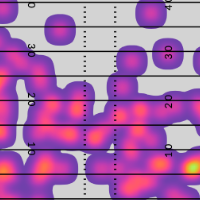
Zoom Type Setting added to Pass Heatmap + Bin Charts
Custom Pages Updates
Groups + New Look
Tags have been added to custom pages allowing users to group + filter custom pages how they see fit. Tags can be created in the new tag manager and can be added in the builder or on any custom pages card page. Cards have also been updated with a new design.
Users can also sort custom pages by choosing to view all pages, their own, or those not created by them. Cards can also be sorted alphabetically or by the traditional order of seeing their own followed by everyone else’s.
Gradient option for conditional formatting for ranked tables
None selected as the Mid Color will color data on a spectrum between the above average and below average colors. Otherwise, data will be colored on a spectrum between above average and mid, and mid and below average.
Group by Filters enabled for table splits
Filters such as vs team, vs starting QB, etc. are now available as splits for custom pages split tables.
General Printing Enhancements
Filters are now included when printing a given page. Collapsed table controls will be excluded.
Transform control added to roster tables
Rank/Stat Display Settings for Splits Tables
This new settings tab allows users to customize tables by choosing what is displayed in a cell (stat, rank, percentile, stat rank, stat percentile), adding additional rows/columns for rank and/or percentile, and which cells are formatted in the table.
Ability for users to change Report Type after creation
Add qualification control to Splits Tables
Users can now add qualifications to split rows/columns in table settings.
Ability to choose "Dynamic - Up to 10 years" as comparison season option incomparison set
Users can now select a comparison set for multiple seasons up to 10 years on split tables.
Scouting positions added to "filter players by" options
Totals row option added to roster tables
Filters
Vs Starting QB Group
Powered by pinned lists.
Yards Before Contact From Sticks
Negative numbers are before the first down line, zero is contact at the first down line, and positive numbers mean first contact occurred past the sticks.
Number of TE + WR side of field
Player Did Play/Start Filters
Available on individual team pages.